
Your website could be running perfectly, with its CMS and plugins fully updated, while the server is still using a vulnerable PHP version.
PHP2Shell affects the server software, so the problem might not be visible in your website dashboard.
On 21 October 2026, the PHP project released emergency patches for two critical vulnerabilities that could allow attackers to run malicious code on affected servers without logging in.
The issue goes beyond WordPress. Businesses using Drupal, Joomla, Magento or custom PHP applications could also be exposed.
New Zealand's National Cyber Security Centre (NCSC) has warned of reported active exploitation, while Amazon Threat Intelligence detected an exploitation attempt before the vulnerabilities were publicly disclosed.
If your website uses PHP, the immediate priority is to confirm that the server has been patched. Updating your CMS or plugins alone won't fix the problem.
Here's how to check your website, what to ask your hosting provider and how to handle the update without causing further problems for your business.
PHP2Shell: What Website Owners Should Do Right Now
If someone else manages your hosting, contact them first.
You need to establish four things:
- Which systems use PHP? Include your main website, customer portals, booking systems and any separately hosted applications.
- Has PHP been patched? The first fixed versions are 8.5.12, 8.4.27, 8.3.36 and 8.2.35. Some hosting providers may use vendor-maintained packages containing the fixes.
- Are both vulnerabilities covered? Ask specifically about CVE-2026-109618 and CVE-2026-109619. The updated software needs to be running, not simply installed.
- Has the server been checked for suspicious activity? Ask your technical team to review unusual requests, server errors and unauthorised changes.
If an affected service cannot be patched immediately, a security specialist should assess whether access needs to be restricted or the service temporarily taken offline.
Which PHP versions are affected?
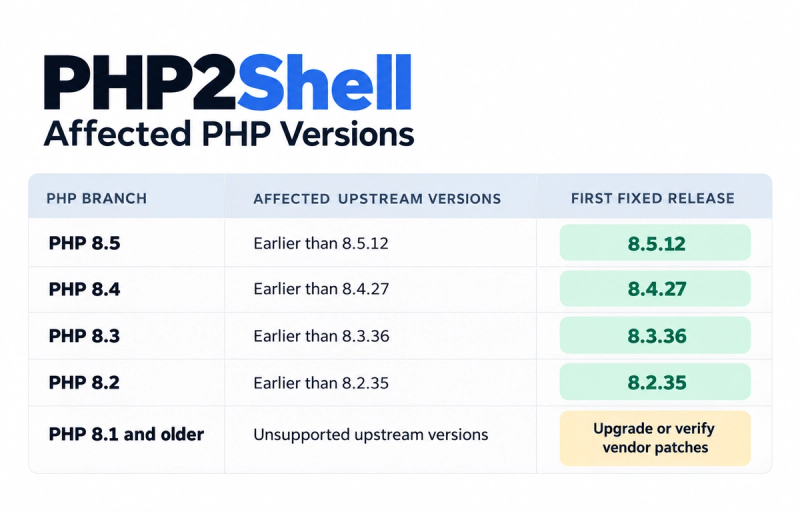
Already using a fixed release? Confirm that it's the version actually serving your website.
Using managed hosting? Your provider may have applied the update already. Ask for written confirmation.
An older version number doesn't always mean a server remains vulnerable. Some vendors apply security patches to existing PHP packages without changing the main version number.
PHP 8.1 and earlier are no longer supported by the upstream PHP project. PHP 8.2 is also approaching the end of its security support on 31 December 2026, so businesses still using it should plan their next upgrade.
The NCSC's official PHP2Shell advisory provides further guidance for New Zealand organisations.
Understanding the PHP2Shell Vulnerability
PHP is a programming language that handles much of the work happening behind a website.
When someone logs into an account, submits an enquiry form or places an order online, PHP may be processing that request on the server.
PHP2Shell involves two weaknesses in how PHP manages memory and internal information while handling those requests.
Both vulnerabilities received a CVSS v4.0 severity score of 9.2 out of 10, putting them in the critical category.
CVE-2026-109618: Memory corruption during error handling
PHP can run out of memory while processing a request.
Under certain conditions, that error interrupts the normal handling of internal data. When PHP tries to clean things up, it may treat information that wasn't properly initialised as valid.
An attacker could potentially exploit this behaviour to execute malicious code.
CVE-2026-109619: Unsafe information retained between requests
Web servers often reuse PHP worker processes to handle multiple requests.
This vulnerability can leave internal information from an earlier request in an unsafe state. When the worker handles another request, that leftover information may be used incorrectly.
Again, the potential outcome is remote code execution.
In practical terms, a successful attack could allow someone to run commands on your server without having a legitimate account.
Why website security plugins may not protect you
The vulnerabilities sit within PHP itself, beneath the content management system.
Some attack paths can be triggered before WordPress or another application has started running its own code.
A security plugin operating inside the website may therefore have no opportunity to stop the attack.
Apache servers using mod_php have been identified as particularly exposed. Other configurations, including PHP-FPM, php-cgi, FrankenPHP and LiteSpeed, also require the relevant updates.
The PHP project's security advisory explains the vulnerabilities in more technical detail.
Why PHP2Shell Puts Business Websites at Risk
An attacker who exploits PHP2Shell may be able to access server files, run unauthorised commands or interfere with your website.
Depending on the server configuration and permissions, that could mean:
- Accessing sensitive customer or business information
- Changing website files or adding malicious scripts
- Redirecting visitors to unfamiliar websites
- Interrupting bookings, purchases or other online services
- Attempting to access connected applications
Take an online retailer whose website shares infrastructure with an inventory system or customer database.
If an attacker gains access to the web server, other systems could also be at risk, depending on how they're connected and secured.
There's evidence that attackers were looking for these vulnerabilities before the public announcement.
Amazon Threat Intelligence reported detecting an exploitation attempt on 17 October 2026, four days before the patches were released.
The NCSC has also acknowledged reports of active exploitation.
Those reports don't establish that any particular business website has been compromised. That requires an investigation.
AI-assisted research also played a role in uncovering PHP2Shell. Researchers used AI tools to analyse PHP's internal code and investigate potential weaknesses.
The speed of these developments makes one thing especially important: knowing which software your business relies on and who is responsible for keeping it updated.
Does PHP2Shell Affect WordPress and Other CMS Platforms?
Yes. WordPress websites can be affected, but this isn't a vulnerability in WordPress core.
WordPress confirmed that no core update is required specifically for PHP2Shell. The security fix needs to happen in PHP.
The same principle applies to other PHP-based platforms.

The complication is that a business may have more than one PHP installation.
Your WordPress marketing site might be patched while a separately hosted booking system is still running an affected version.
A JavaScript-based frontend could also rely on a PHP application in the background.
Your technical team needs to know which systems use PHP, where they're hosted and who maintains them.
This is something we consider when planning website development and integrations at Flight. When different suppliers manage your CMS, hosting and integrations, it's worth being clear about who handles security updates.
How to Check Your PHP Version and Patch Status
You don't need to understand server configuration to start checking your website.
But someone with access to your hosting environment will need to verify the result.
Step 1: Find your PHP version
For WordPress, log into your dashboard and go to:
Tools → Site Health → Info → Server
You'll usually find the PHP version listed there.
You may also find it in cPanel or your hosting provider's dashboard.
If you're using Drupal, Magento or a custom application, ask your hosting provider or developer to confirm the version.
Make sure they're checking the PHP installation handling live website traffic. A server can have a different version installed for command-line tasks.
Step 2: Confirm the security patch
Compare your PHP version with the fixed releases listed earlier.
If the server uses a vendor-maintained package, ask for confirmation that both vulnerabilities have been addressed.
Installing a patch and running the patched version aren't always the same thing.
Some PHP processes continue using previously loaded software until they're restarted or replaced.
Your provider should verify the active PHP runtime after updating.
Step 3: Check connected applications
Don't stop with the main website.
Check whether you have separately hosted customer portals, booking platforms, APIs or internal applications using PHP.
Containers need attention too. If an application includes its own PHP runtime inside a container image, updating the host server won't automatically fix it.
If nobody has a complete list of these systems, ask your technical team to create one.
It should record the hosting provider, PHP version, patch status and person responsible for each application.
What to Ask Your Hosting Provider
If someone else manages your hosting, ask for confirmation of the specific PHP2Shell fixes rather than submitting a general support request about website security.
Your provider should be able to answer:
- Have CVE-2026-109618 and CVE-2026-109619 both been patched?
- Which PHP version or vendor package is installed?
- When was the update completed, and is the live runtime verified?
- Does the patch cover every PHP application hosted under our account?
- Has any suspicious activity been identified?
If they can't answer, ask for the request to be escalated to their infrastructure or security team.
Email template for your hosting provider
Hi team,
We're reviewing our website following the PHP2Shell security advisory.
Could you confirm whether our hosting environment has been patched for CVE-2026-109618 and CVE-2026-109619?
Please include the PHP version or vendor patch installed, when the update was completed and whether the live PHP services have been checked.
Have you identified any suspicious activity, and is there anything we need to do on our side?
Thanks!
Keep their response with your website maintenance records. It'll be useful the next time a security issue affects your hosting environment.
How to Fix the PHP2Shell Vulnerability
The complete fix is to update PHP to a patched release or install a verified vendor-supported security package.
How that happens depends on your hosting arrangement.
For managed websites, the provider will usually handle the server update. Businesses managing their own infrastructure will need their technical teams to deploy the patch.
Before updating
Check that you have recent backups of your website files, database and important configurations.
For more complex websites, arrange compatibility testing where practical. Your developer should know which applications and integrations need checking after the update.
Backups provide a recovery option if a deployment fails, but they don't prevent exploitation. A backup created after a successful attack may also contain malicious changes.
Apply the patch and verify the live server
Update every affected PHP installation.
Once the new software is installed, relevant services and PHP workers may need restarting or replacing.
Then verify the live runtime.
That means confirming that the software handling actual website requests contains the fix, rather than relying only on an installation report or command-line version check.
For websites running across several servers or containers, each affected instance needs checking.
Test the functions your customers use
A successful server update doesn't necessarily mean everything on your website is working.
Submit an enquiry form. Log into a customer account. Try a booking or checkout. Check whether payments and third-party integrations still work.
Your content team should also confirm they can access the CMS and publish updates.
A homepage can load perfectly while a contact form quietly stops sending leads. That's the sort of issue you want to catch before customers do.
Once testing is complete, record the patch version, deployment date and anything that still needs attention.
Temporary Protections While Waiting for a PHP Patch
Sometimes an update can't happen straight away.
Your hosting provider might be preparing patches across multiple servers, or an important application may need compatibility testing.
During that gap, temporary protections may reduce the risk.
Important: Temporary mitigations are not a fix. They may block particular attack methods, but they do not remove the vulnerabilities in PHP. Apply the security patch as soon as possible.
Can a firewall help?
A web application firewall (WAF) can filter certain suspicious requests before they reach PHP.
AWS has published PHP2Shell mitigation guidance covering known attack patterns.
These protections depend on correct configuration. They may not cover every exploit path, especially if traffic can reach the server without passing through the firewall.
What about PHP configuration changes?
The PHP project has documented settings that can reduce particular attack paths.
One example is session.upload_progress.enabled=0, which disables functionality involved in a known exploitation path for CVE-2026-109619.
That change does not fix CVE-2026-109618 or provide complete protection against the other vulnerability.
Other potential controls involve memory handling and request limits. These need careful assessment because changing them can affect legitimate website functions or introduce resource problems.
Some protections must also be applied at the PHP or server configuration level. Changing settings inside application code may be too late to prevent the vulnerable behaviour.
Your hosting provider or system administrator should assess and verify any temporary changes.
Should you take the website offline?
If a vulnerable service cannot be patched promptly, temporarily disabling it may be necessary.
The NCSC recommends considering this option when immediate patching isn't possible.
Taking a business website offline isn't ideal, particularly when it handles enquiries or sales. But keeping an exposed server online could create far greater problems.
The decision should be based on the actual security risk and the protections available.
Signs Your PHP Server May Have Been Compromised
A compromised website won't always look broken.
Visitors might still be able to browse pages, submit forms and complete purchases while suspicious activity is happening behind the scenes.
After patching, ask your hosting provider or security specialist to review relevant activity dating back to at least 17 October 2026, the earliest attempted exploitation reported by Amazon Threat Intelligence.
Look for:

A single error or unusual request doesn't prove PHP2Shell was exploited. Investigators need to examine the timing and other evidence.
If you suspect someone gained access, preserve the relevant logs and files.
Don't immediately delete suspicious material or rebuild the server before a qualified incident response specialist has assessed what happened.
A security specialist needs to confirm whether access was gained, what was affected and what needs fixing before the system can safely return to normal.
Can PHP2Shell Affect Your Website's SEO?
PHP2Shell isn't a Google ranking factor.
The SEO problems arise when an attack or emergency maintenance affects the website.
An attacker might change content or create malicious redirects. Taking the site offline could also leave important pages temporarily unavailable to Google.
A short outage isn't necessarily a problem for rankings. Persistent errors or prolonged downtime, however, can affect crawling and indexing.
Use HTTP 503 during short maintenance periods
If your website needs to go offline temporarily, Google recommends returning HTTP 503 Service Unavailable.
This tells Google that the interruption is temporary.

For an urgent shutdown lasting one or two days, a static maintenance page returning 503 is generally appropriate.
It should explain the interruption and give customers another way to contact the business.
If PHP needs to be disabled, the maintenance page should be served without invoking the vulnerable application.
Google advises against keeping an entire website offline for longer periods. For extended closures, its guidance discusses using an indexable homepage placeholder returning HTTP 200. Any such page must be served from a safe environment.
See Google Search Central's website maintenance guidance.
What should happen during maintenance?
Your hosting or development team should make sure:
- Temporarily unavailable pages return HTTP 503.
- The maintenance page uses static HTML.
- A Retry-After header is included where appropriate.
- robots.txt remains accessible without unnecessary crawl restrictions.
- No accidental noindex directives are added.
- Normal HTTP responses are restored when the website reopens.
Avoid using permanent redirects or 404 errors simply to display a maintenance message.
Check Google Search Console after the website reopens
Once the security team has confirmed the website is safe, review the pages responsible for traffic, enquiries and revenue.
Focus on four areas.
Page Indexing and URL Inspection
Check whether important pages remain accessible and indexable. Look for new server errors, exclusions or unexpected indexing directives.
Crawl Stats
Review server responses and host availability. Temporary 503 errors during maintenance may be expected. Continued errors after reopening need investigation.
Search Performance
Compare clicks, impressions and average positions before and after the outage.
Use GA4 alongside Search Console to understand any changes in organic visits, enquiries and conversions.
Security Issues and Redirects
Check for warnings about compromised content. Confirm that important URLs still resolve correctly and your XML sitemaps remain accessible.
If the incident or maintenance caused indexing problems, Flight Digital's technical SEO team can help assess the effects on crawling, indexation and organic search performance once the website is secure.
What New Zealand Businesses Should Review After Patching
The immediate concern is closing the vulnerabilities. Once that's done, it's worth checking whether your business is prepared for the next critical software update.
Start with responsibility.
Who maintains the PHP runtime? Who manages the CMS? Who checks the hosting environment? And who gets contacted if something goes wrong outside normal business hours?
Those responsibilities aren't always covered by the same supplier.
A business may have a WordPress maintenance agreement but no clear owner for server updates. Another might have several applications hosted by different providers.
Neither arrangement is necessarily a problem, provided everyone knows what they're responsible for.
After PHP2Shell, make sure you have:
- A record of the software and PHP versions used across your systems
- Confirmation that the required patches were applied
- Working backups and a tested recovery process
- Regular server and website monitoring
- A clear contact for urgent technical issues
- A process for testing important website functions after updates
If you're planning a website rebuild or CMS migration, these requirements should be considered during development.
Our Headless CMS SEO checklist covers other technical considerations, including crawlability, URLs, metadata and how development decisions affect search performance.
A different CMS won't automatically solve security maintenance. Whatever technology your business uses, someone still needs to look after it.
Keeping Your Website Secure, Functional and Visible
A vulnerable PHP installation isn't something customers can see. But if it leads to downtime, failed enquiries or a compromised website, they'll feel the impact.
The same goes for updates that aren't properly tested.
A security patch might fix the underlying server issue while accidentally breaking a booking form or interrupting an important integration.
Before signing off on the update, test the parts of the website your customers rely on.
At Flight, we don't stop at checking whether a website is back online. We also look at whether its key pages are accessible, enquiry forms are working and Google can still crawl the content.
Our development and SEO teams can help businesses review their website setup, plan technical improvements and investigate issues affecting functionality, crawling and organic performance.
If your website needs specialist cybersecurity investigation, that work should be handled by a qualified security professional.
Need a clearer picture of your website's technical health?
Talk to Flight Digital about your website, the systems supporting it and how to keep your digital experience performing.